Project Insight
Divisible Event Center AV System: Three Rooms, One Flexible Platform
Three rooms, one flexible event and training environment. 210 Solutions brings room combining, audio, video, projection, lighting, and assisted listening together through practical iPad control.
Short answer
What to know
This event center AV system lets three divisible rooms operate independently, combine in pairs, or become one large event space. Coordinated control and routing keep microphones, presentation sources, projection, and audio aligned with the selected room configuration.
Resource guide
The full explanation
Watch the project walkthrough, then explore how the room controls and routing work together.
Project overview: one venue, several ways to use it
210 Solutions designed and installed this AV system for an event and training environment with three divisible rooms. Each room can host its own session, two rooms can work together while the third stays independent, or all three can become one larger event space.
The design brings video, audio, projection, lighting presets, presentation sources, room combining, and assisted listening into a coordinated operating experience. The aim is everyday control that normal staff can use, with the routing flexibility needed for larger events.
This is a multipurpose event center AV project: the central challenge is making the installed systems follow the changing physical layout of the venue.
At a glance
- Three divisible rooms operate independently, in paired configurations, or as one combined event space.
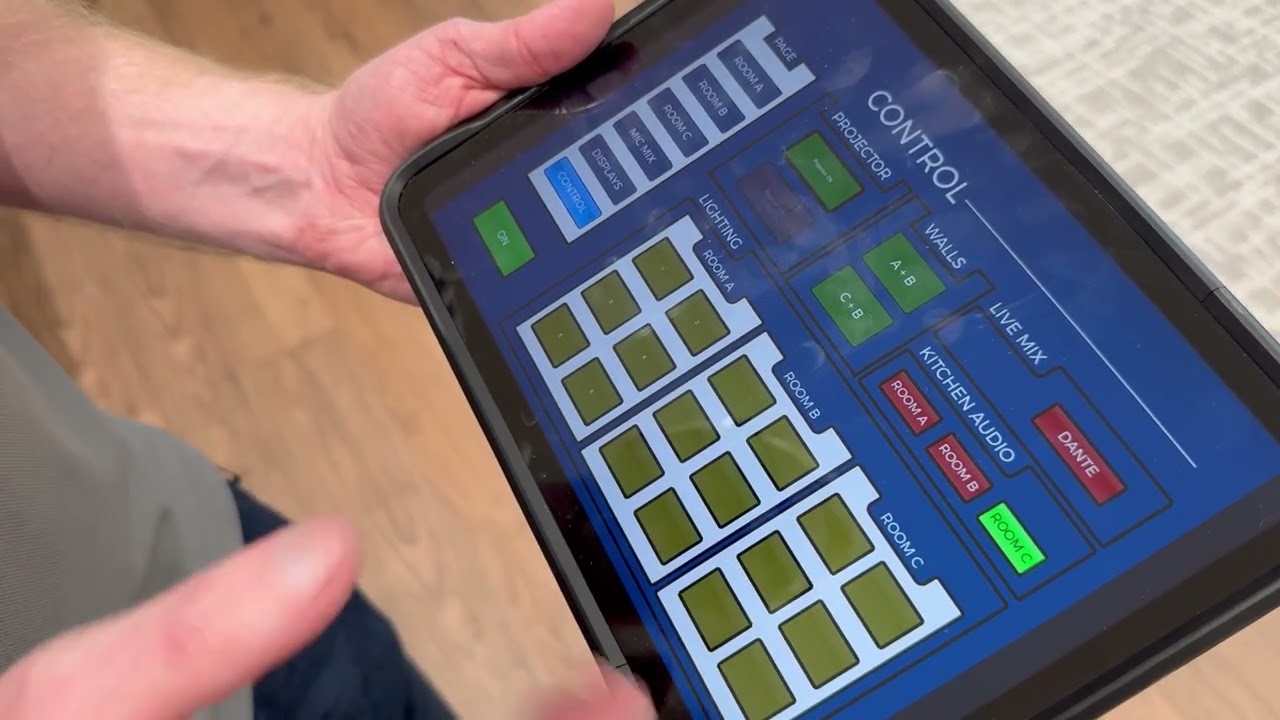
- An iPad interface coordinates the room configuration, presentation sources, sound, projection, and lighting presets.
- Dante audio routing supports everyday room use and an external live-mixer workflow.
- Motorized screens and projector lifts help the venue change between presentation and other event uses.
Flexible room combining: Rooms A, B and C
Opening a partition changes the audience area. The AV system has to change with it. Microphones that belong to one room may need to reach a combined audience, while the room next door must retain its own sources and volume controls.
The room configuration selected in the control interface establishes which spaces work together. Audio distribution, video destinations, source selection, and the controls available to staff need to agree with that choice.
Three operating arrangements
- A | B | C — three independent rooms: separate source selection, microphone routing, and audio control for concurrent sessions.
- Two combined rooms + one separate room: a shared presentation and audio environment for the paired rooms, with independent operation in the remaining room.
- A + B + C — one large event space: coordinated video, microphones, program audio, and control across the combined audience area.
The key is matching the selected AV configuration to the actual partition layout. The system should not leave staff guessing which microphone or screen belongs to which event.
iPad control built around what staff need to do
The iPad-based AV control interface gives staff a practical way to operate the venue without working directly with the equipment rack. They can select presentation sources, choose the room configuration, manage microphones and volume, and control the projectors, screens, lifts, and lighting presets.
A room preset brings related actions together. Staff choose how the space will be used, then make normal adjustments for the event. That reduces the number of separate controls they have to remember.
The interface is the visible part of a larger control system. Room-combining logic and audio/video routing still have to be designed and programmed behind it; an iPad by itself does not provide that coordination.
Motorized projection that deploys with the room
The installation includes motorized projection screens and projector lifts. Deployment is controlled as part of the AV workflow, allowing projection to become part of the selected room preset.
When the space is ready for a presentation, the system brings the projection equipment into use. When projection is no longer needed, the screens and lifts can retract, keeping the room visually clean for other activities.
In this kind of installation, sequencing matters. Screen movement, lift travel, and projector operation should follow the equipment requirements and the intended use of the room. Those actions belong in the control design rather than a collection of unrelated remotes.
Video matrixing: send the right source to the right room
Video matrixing means selecting which source feeds which destination. Here, that lets presentation content follow the event center's configuration instead of being permanently tied to one screen.
The presentation options include wired HDMI and wireless presentation with Barco ClickShare. In separate-room operation, each room can use its own selected source. In combined operation, the chosen presentation can be routed to the projection destinations serving the larger audience.
The useful result is flexibility for presenters: connect a source, select where it should be shown, and let the installed video routing handle the distribution.
Dante audio that follows the room configuration
The audio system uses Dante networked audio to move audio channels between compatible devices over the network. This supports flexible routing for microphones and program audio across the three rooms.
With all rooms separate, each event needs its own audio path. When two rooms combine, their audience areas share the intended event audio while the third stays independent. With all three rooms combined, the microphones and presentation audio can serve the larger space.
Dante carries the audio; the programmed room logic and audio processing determine which channels feed which areas. Keeping those responsibilities coordinated is what makes a divisible room system behave predictably.
That is why commercial sound system design involves more than speaker placement. Microphone routing, gain, coverage, control, and network operation all affect what the audience hears.
An external live mixer for more demanding events
The system also provides a way to integrate an external live audio mixer. Dante channels can be routed to a compatible mixer, with the mixed audio returned to the installed system for distribution.
That gives the facility two useful operating modes. Everyday presentations can stay simple for staff. A larger or more complex event can bring in an audio operator who needs hands-on control of microphones and program sources.
The send and return paths must be defined deliberately so the console receives the intended inputs and its output reaches the correct rooms. Routing the returned mix back into its own input path would create a loop, so the production workflow needs to be planned as part of the system.
Assisted listening over the facility's Wi-Fi
The project includes Listen Technologies' Listen EVERYWHERE system for assisted listening. Guests can connect a compatible smartphone to the designated facility Wi-Fi, open the supported listening app, select the appropriate audio channel, and listen through headphones or earbuds.
This provides a personal listening option alongside the room loudspeakers. It is especially useful when a guest needs a clearer, individually adjustable feed of the presentation.
The experience depends on suitable Wi-Fi coverage, access to the audio server, clear channel labeling, and straightforward guest instructions. Smartphone listening can reduce reliance on checkout equipment for guests who bring compatible devices, but a venue should also plan for guests who do not.
For readers planning a new system today: Listen EVERYWHERE is a legacy product line, and the mobile app is now called ListenWIFI. Listen Technologies identifies ListenWIFI as its current replacement platform. Device availability and accessibility provisions should be reviewed for each facility.
Where this approach fits
The same design approach makes sense wherever one commercial space regularly changes size, audience, or purpose.
- Event centers and conference centers
- Corporate training facilities and campuses
- Hospitality, banquet, and meeting spaces
- Church multipurpose rooms
- Education and professional training facilities
Existing venues can also benefit from AV modernization and support when room controls, routing, or projection no longer match how the facility is used. Where events also need to reach remote audiences, broadcast and live-streaming planning is a related requirement to evaluate.
The 210 perspective: flexibility should feel simple
The goal was a venue that staff could reconfigure without having to understand the audio and video infrastructure behind it. Three rooms should feel like three rooms when divided, and like one system when combined.
That requires the visible controls and the less visible infrastructure to be designed together. Projection, lighting, microphone routing, presentation sources, audio distribution, and assisted listening all contribute to the experience.
This is how 210 Solutions approaches commercial AV integration: start with how the space needs to work, then choose and coordinate the technology that supports it.
Related project stories and planning guidance
For another example of flexible training space, see the MUST Ministries divisible training room project. Its separate project story shows how room configuration shapes AV operation.
If you are evaluating the display approach for a large venue, our LED wall, projector, and video wall comparison explains the tradeoffs. You can also explore more 210 Solutions projects or our approach to performance and large-space AV.
Common questions about divisible event center AV
What makes divisible room AV different from a standard meeting room?
The system must support several physical room configurations. Microphones, program audio, video destinations, and controls need to follow the rooms that are combined while keeping other rooms independent.
Does Dante automatically combine the rooms?
No. Dante transports audio between compatible devices. The installed control logic and audio processing establish how those channels are used for each room configuration.
Can everyday staff operate a system that supports a live mixer?
Yes, when the everyday controls and the production workflow are designed separately within the same system. This project provides simple staff operation along with a Dante send-and-return path for a compatible external mixer.
Can an existing event center AV system be upgraded?
The starting point is an assessment of the existing controls, signal paths, network, projection, audio, and room-combining behavior. That establishes what can be retained and what needs to change.
Planning a divisible conference center, training facility or event space?
Use the contact form below to tell 210 Solutions about a new AV system, an upgrade, room combining, audio and video modernization, or an existing system that needs troubleshooting. Based in the Atlanta area, we support commercial facilities across Georgia and the Southeast and undertake larger projects nationally.
Need help applying this?
Start with the problem, not the product.
Tell 210 Solutions what is happening in your building and what you need the system to accomplish.