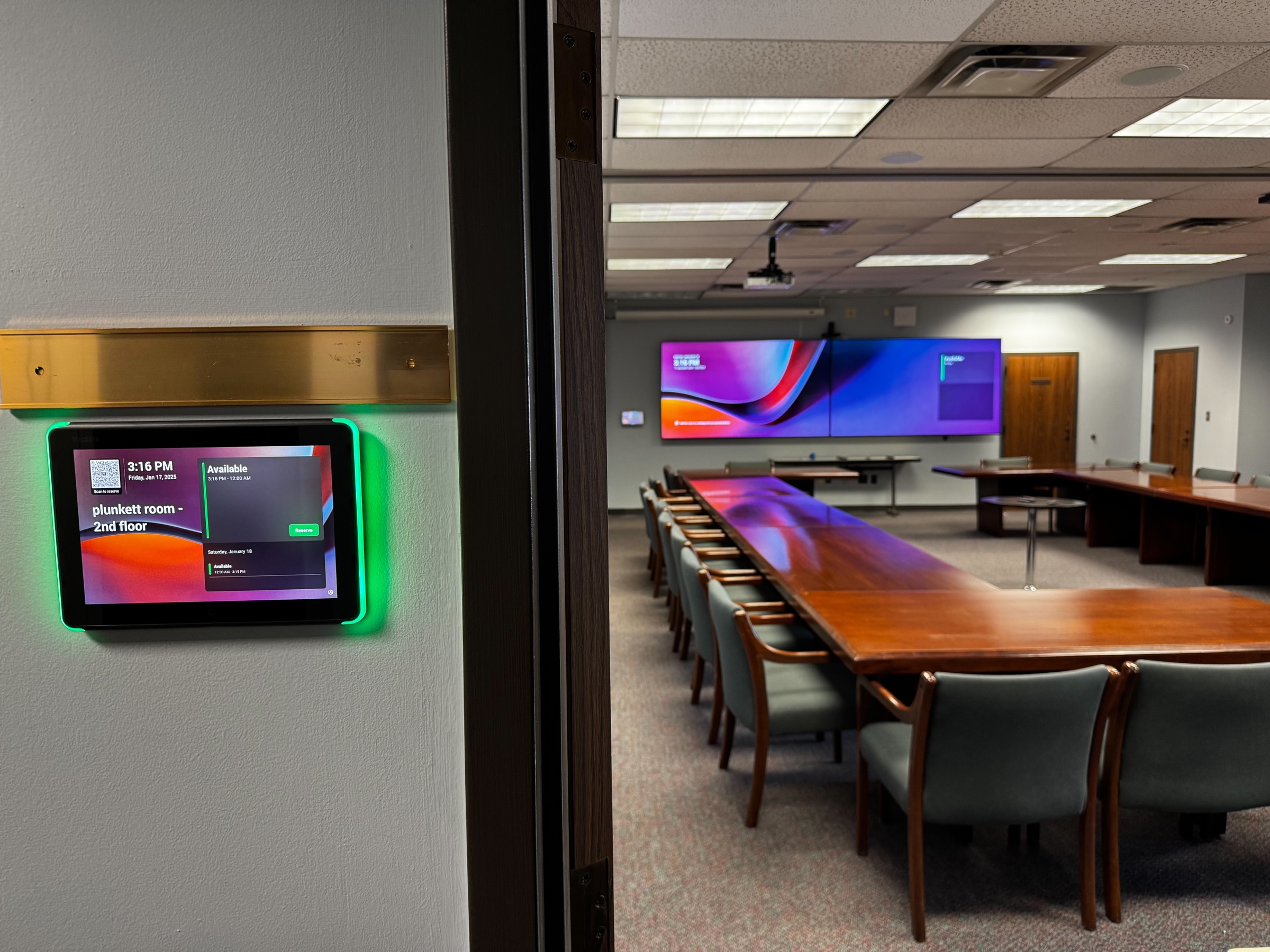
Yealink room scheduler outside SREB’s Plunkett training room with dual displays visible inside

210 Solutions Project

SREB Atlanta Conference Room Modernization

SREB needed three Atlanta conference rooms that would start reliably without laptops, adapters, or a patchwork of aging equipment. 210 Solutions standardized the President’s, lobby, and Plunkett rooms on Yealink-powered Microsoft Teams Rooms, giving each space a consistent one-touch meeting experience.

Southern Regional Education Board (SREB)

Atlanta, Georgia

The environment

Start with the environment and the operating reality.

Project walkthrough: See the featured SREB conference-room installations and hear the completed audio system in action.

The Southern Regional Education Board (SREB) is a nonpartisan, nonprofit interstate compact that works with 16 states to improve education from early childhood through doctoral education and the workforce. Its headquarters is in Atlanta near Georgia Tech.

SREB’s Atlanta team needed three conference rooms to support executive meetings, routine collaboration, hybrid sessions, and training: the President’s Conference Room, the lobby conference room, and the Plunkett Conference Room.

The President’s and lobby rooms use nearly identical Yealink room designs, giving users the same familiar operating experience in either space. The primary difference is the microphone setup: the President’s Conference Room uses wired table microphones, while the lobby room uses wireless microphones.

Plunkett functions primarily as SREB’s larger training room. It received the more advanced system, with broader audio coverage, dual displays, flexible presentation options, camera tracking, and a room scheduler outside the door so employees can see availability or reserve the space.

The challenge

Before the upgrade, users often had to bring a laptop into the room and connect it through a mix of Owl devices and aging Extron equipment. That patchwork had become unreliable, and the meeting experience changed depending on the room, the laptop, and which connection path happened to work that day.

Simple meetings could turn into a troubleshooting exercise. Remote participants could struggle to hear the room clearly, camera coverage was limited, and starting a call or sharing content could require extra setup or IT help.

SREB needed the rooms to work as dedicated collaboration spaces instead of collections of separate devices.

The constraints

One project had to serve three rooms with different audiences and use cases while keeping the user experience consistent. The President’s and lobby rooms needed matching day-to-day operation with microphone choices suited to each room, while Plunkett required the expanded coverage and flexibility of a training environment.

The solution also had to support SREB’s Microsoft Teams workflow, accommodate supported meetings hosted on other common platforms, provide practical guest presentation options, and remain straightforward for the internal team to support.

The approach

Design the system around the people who use it.

210 Solutions designed all three spaces around dedicated Yealink Microsoft Teams Rooms. The President’s and lobby conference rooms use closely matched room designs so employees do not have to learn a different workflow when they change spaces. Wired table microphones support the President’s room, while wireless microphones give the lobby room more flexibility.

The Plunkett Conference Room was treated as the training space. Its Yealink MVC S90 architecture adds ceiling microphones, distributed loudspeakers, dual displays, camera tracking, scheduling, and room automation for larger sessions.

Although the equipment changes with the room, the operating idea stays the same. Scheduled Teams meetings appear on the room console for one-touch join. SREB’s configured Teams Rooms interoperability also supports joining eligible Zoom, Webex, and Google Meet invitations from the scheduled-room workflow; the precise features available can vary by meeting platform.

The result-first priority was simple: remove the laptop-and-adapter ritual and give users one familiar interface across all three rooms.

What 210 delivered

From plan to a working, supportable system.

Scope

The project included:

  • Dedicated Yealink Microsoft Teams Rooms in three conference spaces
  • Closely matched systems in the President’s and lobby conference rooms
  • Wired table microphones in the President’s Conference Room
  • Wireless microphones in the lobby conference room
  • A Yealink MVC S90 system for the Plunkett training room
  • Commercial displays sized for each space, including dual displays in Plunkett
  • Intelligent camera framing, speaker tracking, and presenter tracking
  • Touch-based room controls with one-touch join for scheduled Teams meetings
  • A Yealink room scheduling panel outside Plunkett
  • Configured support for eligible Zoom, Webex, and Google Meet invitations through Microsoft Teams Rooms interoperability
  • Wireless and wired presentation options
  • Four Yealink CM20 ceiling microphones and six distributed ceiling loudspeakers in Plunkett
  • Scheduling and occupancy-based room automation

Execution

The President’s and lobby conference rooms were built around nearly identical Yealink meeting experiences. Both give users the same familiar room interface and straightforward meeting controls. The microphone systems were tailored to the way each room is used: wired table microphones in the President’s Conference Room and wireless microphones in the lobby conference room.

The lobby room includes a 65-inch commercial display with a Yealink MeetingBar A30. The all-in-one bar combines camera, microphone, and loudspeaker functions, while its dual-camera design supports automatic framing and speaker tracking. A touch controller simplifies meeting operation, and a presentation accessory gives guests a direct way to share content.

Plunkett required a more distributed training-room design. Dual 4K displays improve visibility for presentation material and remote participants. A pan-tilt-zoom camera provides presenter tracking, while four Yealink CM20 ceiling microphones and six ceiling loudspeakers extend audio coverage across the room. A Yealink scheduling panel outside the door shows availability and lets staff reserve the space.

Once a meeting is scheduled, the room console presents the session for a straightforward one-touch start. Instead of arriving with a laptop and rebuilding the old Owl-and-Extron connection path, users can walk into any of the three rooms, tap Join, and use the installed camera, microphones, speakers, and displays. Wired and wireless presentation paths remain available when content sharing or guest devices are needed.

The outcome

Technology that supports the operation.

The completed project gives SREB one consistent meeting experience across three distinct spaces. The President’s and lobby rooms provide matching everyday operation with microphone systems suited to each room, while Plunkett delivers the expanded capabilities needed for training and larger sessions.

Employees no longer have to treat every call like an AV setup project: the room is scheduled, the meeting appears on the console, and the session begins with a tap.

Teams meetings are the native workflow, while configured interoperability gives SREB a practical path into supported Zoom, Webex, and Google Meet invitations. Participants can hear and see each other more naturally, presenters have clearer sharing options, and the internal team has a standardized Yealink platform to support.

210 Solutions later extended that same practical, supportable approach to SREB’s building-wide security systems. View the SREB headquarters physical-security modernization.

Key takeaway

The right room standard removes setup anxiety: schedule the meeting, walk in, tap Join, and use the same familiar interface every time.

Plan the next project

Tell us what your building needs to do better.

Start with the people, the room, and the problem. We will help define a practical next step.